


Over the past year, we've been making Discord feel at home on Linux: a brand-new updater, faster screen sharing, Wayland support across the board, and some love for the Steam Deck. Let's get into it!

Engineering & Developers
Discord <3 Linux: A Year of Upgrades

Josh Stratton
November 12, 2026
Updates That Just Update
If you're on Linux, you know how it goes: Discord says there's an update, you go download and install a fresh package, and you do it all again next week. We heard you.
The days of downloading a fresh .deb every week are over. Getting there meant working around some very Linux-y constraints. Distro packages install to places like /usr/bin that Discord can't write to without root, but packages aren't supposed to put files in your home folder either. Immutable distros like SteamOS and Bazzite lock down the base system and get most apps through Flatpak. Plenty of you install Discord from community packages built from our tarball (hi, AUR!). We needed something that worked for all of these formats. In the end, we settled on a new Rust-based updater that installs like a normal package, but installs the updates in a writable location.
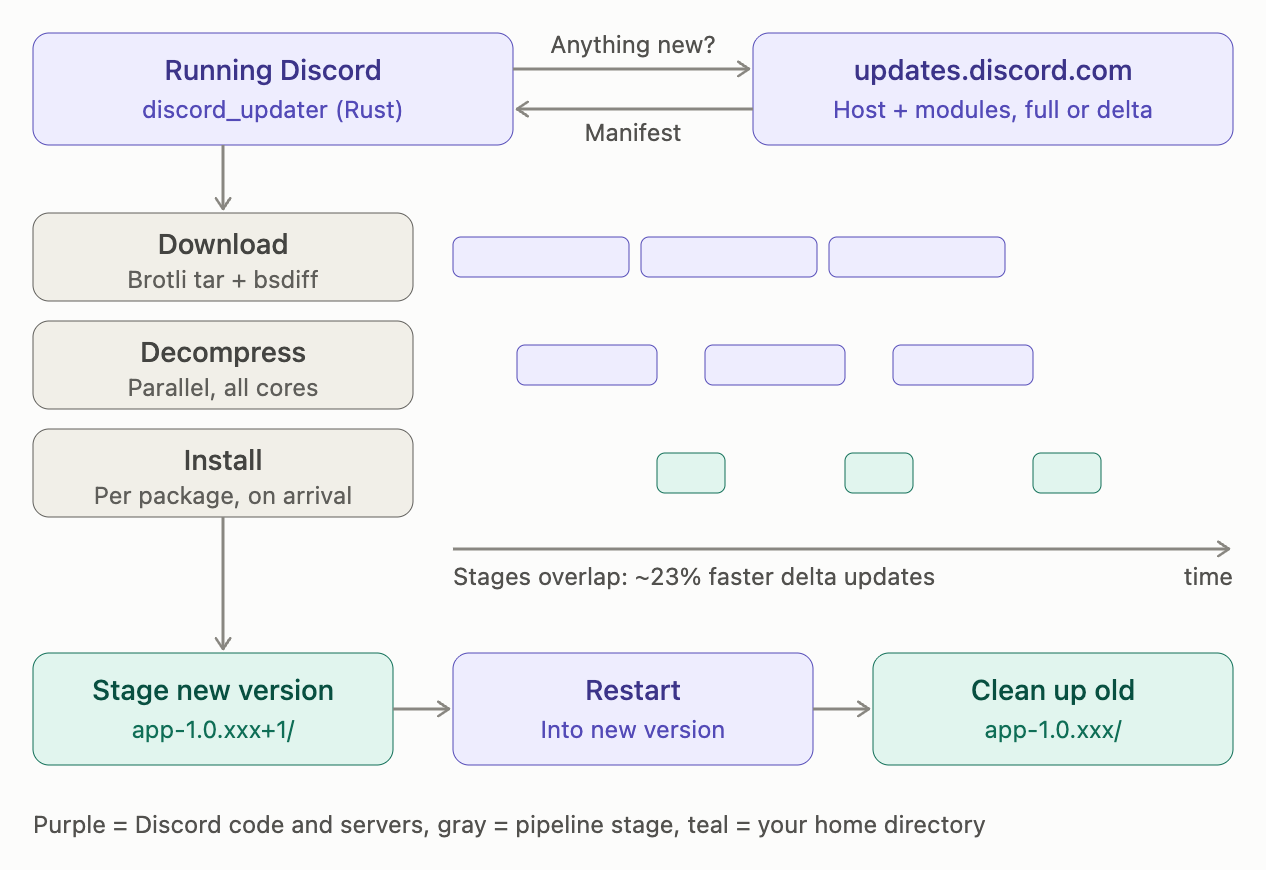
The result is a big quality-of-life upgrade:
- Install once, update forever. The .deb, .rpm, Arch package, and tarball are now a small bootstrapper that installs Discord into your home directory. After that, Discord updates itself, no sudo required.
- Delta patches. Updates arrive as binary diffs (using bsdiff), so you only download what changed. Files whose contents and permissions haven't changed are skipped entirely (updates were previously chunked only on a per-file basis).
- Faster updates. Decompression is now multithreaded, and each package installs as soon as its download finishes. We measured that delta updates on Linux are, on average, about 23% faster.
- More formats. The download page now offers .rpm and .pkg.tar.zst next to .deb and .tar.gz. Fedora and Arch folks, we see you.
This new updater required changes from the various Discord packages the community maintains, so big thanks to those maintainers for helping get this rolled out.
Go Live with More Wayland and More Hardware
X11 and Wayland are the two main windowing systems on Linux, and they handle screen capture very differently. X11 is laissez-faire, while Wayland is built around isolation and privacy: apps can't see your screen or each other's windows unless you say so. Wayland is now the default on most major distros, so that's the future we built for. We teamed up with Igalia, experts in Linux screensharing, to build a great screenshare experience across different platforms and desktops.
Wayland exposes a screen or app sharing handle through a system dialog, so nothing is shared with the app until the user gives permission. Once granted, Discord receives access to a PipeWire stream that carries video frames of the selected screen or window. Discord submits the captured frames for hardware encoding through VA-API on supported Intel and AMD GPUs, or NVENC on supported Nvidia GPUs. The compressed bitstream is then returned to Discord, encrypted, and sent over the network to other clients.
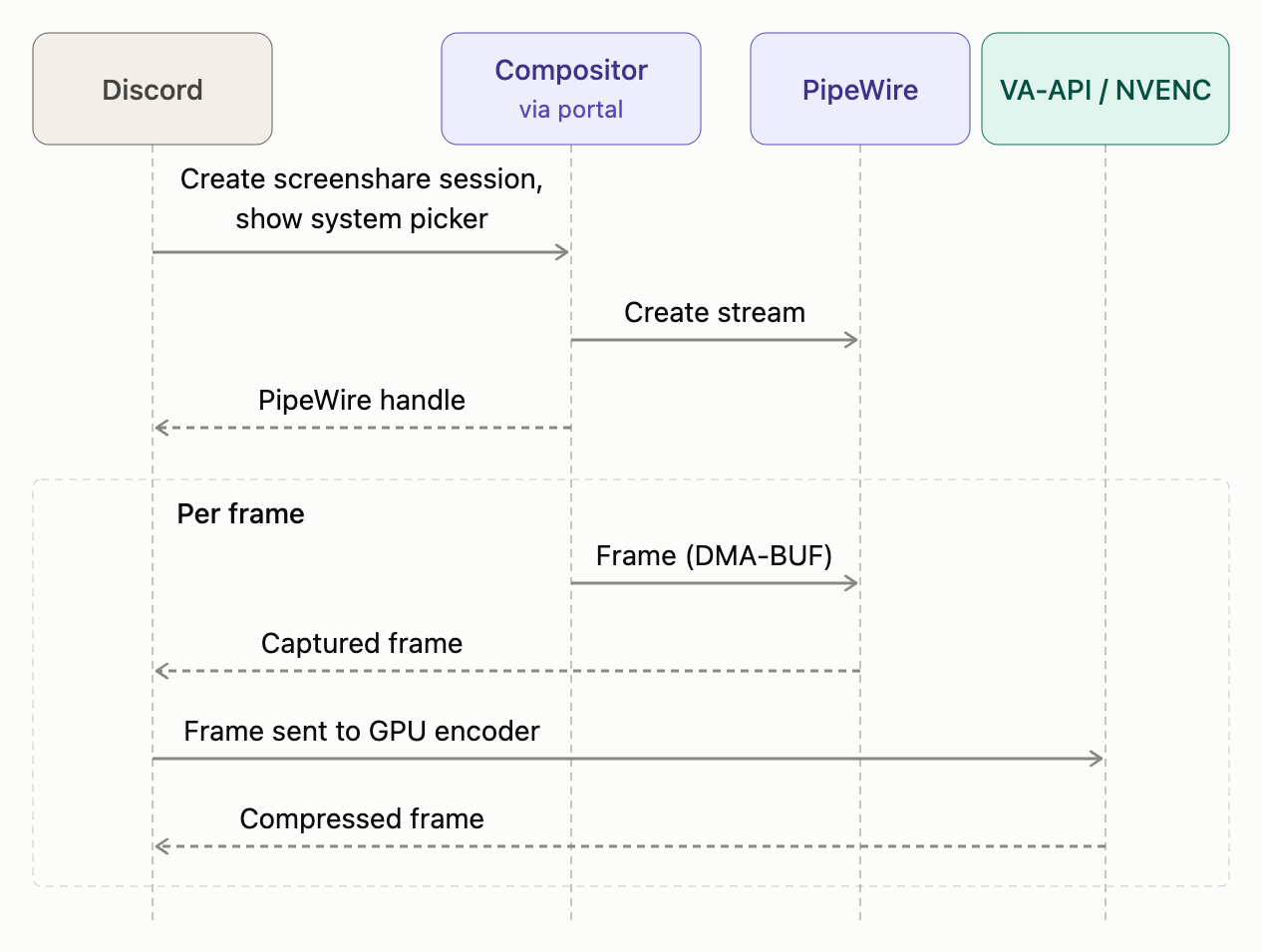
Here's what changed:
- Wayland screenshare. We now leverage existing Wayland and PipeWire capabilities to lighten CPU load and make better use of your GPU. This is enabled for GNOME, KDE, gamescope, and other compositors.
- Steam Deck. Go Live works in both Game Mode (gamescope) and Desktop Mode, so you can stream efficiently on the go.
- Hardware encoding. We now support more OS- and GPU-supplied hardware video encoding formats. This makes sure that your NVIDIA, Intel, or AMD GPU is used to the max, while the CPU remains free for your game.

Push-to-Talk etc. on Wayland
Global keybinds on Wayland were a long-standing pain point. Wayland (rightly) doesn't let apps listen to your keyboard in the background. Instead, it provides a GlobalShortcuts API, but the implementation can be a little tricky. The spec says a shortcut looks like "<Control>z", but KDE expects "CTRL+z", so Discord figures out which desktop you're on and speaks its dialect (send the wrong one and the portal session can fall over entirely). And since every bind request can pop up an approval dialog, we only ask again when your keybinds actually change, instead of nagging you every time Discord starts. Now, features like push-to-talk work on Linux, even when Discord isn't focused.
What's Next: More Control of Sound Sharing
We’ve covered a lot of Linux improvements, but there’s more to do before we reach parity with the other desktop platforms. That means changing to the Wayland infrastructure itself. We use xdg-desktop-portal for screenshare, but that doesn’t provide a handle to capture app audio. Linux users have to choose between sharing audio for their whole desktop or sharing no audio at all. That’s not an experience we can accept long term, so we’re building per-app audio sharing on Wayland and giving it to the Linux community.
We’ve once again teamed up with Igalia to implement per-app audio sharing in xdg-desktop-portal, letting you pick exactly which app's audio is shared. We’re even implementing it on GNOME and KDE ourselves to get it to users faster. This will take some time to reach critical mass across Linux desktops, but it’s a long-term investment to make a great Linux screenshare experience for both Discord and all screensharing apps. Stay tuned!
See You in the Call
Linux folks, this one's for you. Update Discord (well, let it update itself, finally), hop in a call, and hang out. And if building this stuff sounds fun, we're hiring.
*hands the penguin a headset and waves goodbye* 🐧




















English (US)


Product
Product

Company
Company
Resources
Resources
Policies
Policies
